




Your SEO team has been working on your website. The pages are optimized, blogs are being published, keywords have been added, and everyone is waiting for one thing: Google traffic. And… not much is happening.
That is one of the most frustrating things about SEO. You can spend weeks improving a website without really knowing what Google thinks about it. Maybe your pages are appearing in search but nobody is clicking. Maybe Google hasn’t indexed an important page. Or perhaps your website is showing up for searches you never even considered targeting.
This is where Google Search Console becomes incredibly useful.
Instead of guessing what is happening in Google Search, Search Console gives you actual data. You can see which searches are showing your website, which pages are getting clicks, how visible your website is, and whether Google is having trouble finding or indexing your content.
For businesses in Dubai, that information matters. The market is competitive, customers are searching online and your competitors are likely investing in their own visibility.
So, if you are serious about SEO, it helps to know exactly what is happening behind the scenes.
What Is Google Search Console?
Google Search Console is a free Google tool that helps you understand how your website performs in Google Search.
It gives you a look at your website from Google’s perspective.
You can use Search Console to find out:
- Which search queries show your website
- How often your pages appear in Google
- How many people click your results
- Which pages are getting search visibility
- Where your pages appear in search results
- Whether Google has indexed your pages
- Whether Google has encountered indexing problems
- How your website performs across different devices
Think of it as a health check for your website’s presence on Google.
Your website may look completely fine when you visit it. But that doesn’t necessarily mean Google can crawl and understand every page properly.
Search Console helps you spot what you cannot see just by looking at your website.
And yes, it is free.
Why Does Search Console Matter for Dubai Businesses?
Dubai is a competitive digital market.
Whether you run a real estate company, hotel, restaurant, clinic, law firm, e-commerce store, or marketing agency, there are likely plenty of other businesses trying to appear for the same searches.
Take a simple example. Suppose you run a digital marketing agency in Dubai. You might assume your biggest keyword is “digital marketing agency Dubai.” Fair enough.
But when you look at your Search Console data, you may discover that your website is also appearing for:
- digital marketing services Dubai
- SEO company Dubai
- SEO services Dubai
- online marketing agency Dubai
- digital marketing consultant Dubai
That is valuable information. It tells you how Google is connecting your website with different searches. You can use those insights to improve existing pages, create new content,t and find gaps in your SEO strategy.
Instead of relying entirely on “I think people are searching for this.” you can work with “Here is what people are actually searching for.”
That is a much stronger starting point for SEO.
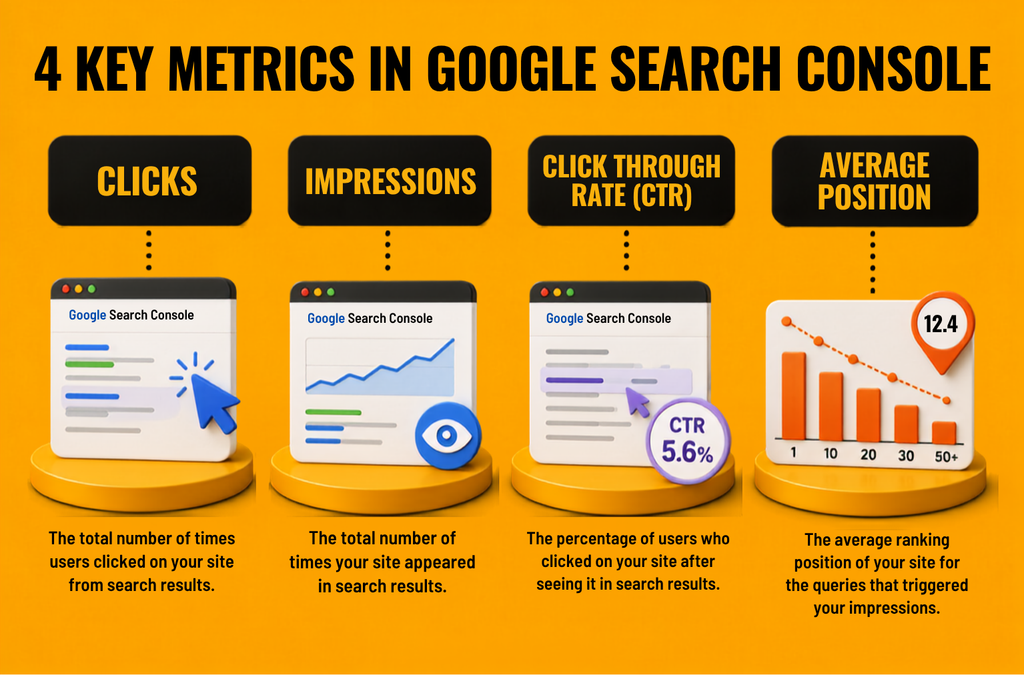
The Four Google Search Console Metrics You Should Know
When you first open Search Console, the amount of data can look slightly overwhelming. Don’t worry. You do not need to understand everything immediately.
Start with these four metrics.
- Clicks
Clicks are much easier to understand. A click means someone clicked your website from Google Search.
For example:
If your website receives 500 clicks, 500 people clicked through from Google’s results. But do not look at clicks alone.
A page receiving 500 clicks from 2,000 impressions is performing differently from a page receiving 500 clicks from 20,000 impressions.
That is where CTR becomes useful.
- Impressions
An impression means your website appeared in a Google Search result.
For Example:
If your website receives 10,000 impressions, your pages appeared in search results 10,000 times. That does not mean 10,000 people visited your website. It simply means Google showed your website.
Impressions are useful for understanding visibility.
If your impressions are increasing, it could mean Google is showing your website for more searches or showing it more frequently.
- Click-Through Rate
CTR, or click-through rate, tells you how many people clicked your result after seeing it.
For example:
10,000 impressions + 500 clicks = 5% CTR
Now imagine another page receives the same 10,000 impressions but only 100 clicks. That page has a 1% CTR.
Something is worth investigating. Maybe the title is not attractive enough. Maybe the page does not match the search intent. Maybe competing results are doing a better job of convincing people to click.
Search Console may not give you the complete answer, but it gives you a clue.
- Average Position
Average position gives you an indication of where your website appears in Google’s search results. But don’t treat it as a permanent ranking.
For Example:
Your website can appear at different positions for different searches, devices, locations, and users. So if Search Console shows an average position of 8, that does not mean your website permanently sits at number eight.
Look for trends instead. Are important pages moving up? Are impressions increasing? Are clicks falling? Are certain queries performing better than others?
Those patterns tell you much more than one ranking number.
The Search Console Reports Worth Your Attention
You do not need to become an expert in every Search Console feature.
Start with the reports that can actually help you make better SEO decisions.
Performance Report
The Performance report is where things get interesting.
It lets you analyze:
- Queries
- Pages
- Clicks
- Impressions
- CTR
- Average position
- Countries
- Devices
For a Dubai business, this can reveal exactly how your website is appearing in search.
Imagine you run a Dubai property company. You might discover that one page is getting impressions for searches related to property investment, while another is appearing for searches related to specific neighborhoods.
Those insights can influence your content strategy. Instead of sitting in a meeting asking, “What should we write about next?”, you can use actual search data to find potential topics.
That is much better than publishing another generic blog because someone decided it “sounds SEO-friendly.”
URL Inspection Tool
Ever published a new page and wondered why Google seems to be ignoring it?
The URL Inspection tool can help.
You can enter a specific URL and check information about how Google sees the page, including indexing-related information and potential problems.
It is useful when you:
- Publish a new page
- Update an important landing page
- Change a URL
- Launch a new website
- Fix technical SEO issues
You can also request indexing when appropriate. However, requesting indexing does not guarantee that Google will immediately index or rank your page. If only SEO worked that quickly.
Page Indexing Report
This report answers a very important question:
“Has Google actually indexed my pages?”
You could have an excellent service page with brilliant content.
But if Google cannot properly index it, your chances of appearing in organic search are limited.
The Page Indexing report helps you identify which pages Google has indexed and which pages may have encountered issues.
This is particularly important for larger websites such as:
- E-commerce stores
- Property websites
- Travel websites
- Large service businesses
- Websites with hundreds of location pages
The more pages you have, the more important it becomes to keep an eye on indexing.
Sitemaps
An XML sitemap is essentially a list of URLs on your website that you want search engines to discover.
Submitting your sitemap through Search Console can help Google discover important pages.
It is not a secret ranking trick.
It simply makes Google’s job a little easier, which becomes particularly useful for large or frequently updated websites.
How to Use Google Search Console for Better SEO
Installing Search Console is one thing.
Actually using the information is where the real value lies.
Step 1:Find Keywords You Didn’t Know You Were Ranking For
Look through your search queries. You may find some surprising results.
For example, a Dubai accounting company might discover that its website is appearing for searches related to VAT, bookkeeping, corporate tax, and accounting services.
Those searches could become:
- New blog topics
- Service pages
- FAQs
- Supporting content
- Internal linking opportunities
You are not starting from scratch. Google is already giving you clues about what it considers relevant. Pay attention to them.
Step 2 : Find Pages With High Impressions but Low CTR
This is one of the easiest opportunities to spot.
Imagine a page receives:
- 20,000 impressions
- 400 clicks
- 2% CTR
Google is already showing the page. So perhaps the problem is not visibility. Perhaps people simply aren’t choosing your result.
- Look at the page title.
- Review the meta description.
- Compare your result with competitors.
- Check whether your content actually matches what people searching that query want.
Sometimes, a page does not need more keywords. It needs a better reason for someone to click.
Step 3 : Find Page-Two Opportunities
Page two of Google is not exactly where you want your business to live. But a page sitting around positions 11-20 is not necessarily a lost cause. It already has some relevance in Google’s eyes.
Before creating another page targeting the same topic, see whether you can improve the existing one.
You could:
- Add missing information
- Update outdated content
- Improve headings
- Add relevant examples
- Strengthen internal links
- Answer related questions
- Improve readability
You already have Google’s attention. Now give it a stronger reason to move the page higher.
Common Google Search Console Mistakes
Checking Rankings Every Day
Your rankings will move. That is normal. Do not let one bad day convince you that your SEO strategy has collapsed.
Look for longer-term trends.
Treating Impressions as Traffic
An impression means your website appeared. It does not mean somebody visited.
Always look at impressions, clicks, and CTR together.
Chasing Every Keyword
You do not need to rank for every keyword under the sun.
Focus on searches that are relevant to your business and customers.
Ignoring Technical Problems
If important pages are not indexed, publishing another ten blogs probably will not solve the problem.
Find the technical issue first.
Expecting Search Console to Fix Your SEO
Search Console is not a magic button. It gives you information.
You still need to turn that information into action.
How Often Should You Check Search Console?
You do not need to make Search Console your new full-time hobby.
For most businesses investing in SEO, a simple routine is enough.
Weekly: Check for major changes, indexing problems, and sudden drops.
Monthly: Review queries, pages, clicks, impressions, CTR, and average position.
Quarterly: Look at bigger trends, content performance,ce and technical issues.
Larger websites or businesses running active SEO campaigns may need to monitor performance more frequently.
Final Thoughts
SEO becomes much easier to manage when you stop guessing.
That is ultimately what Google Search Console helps you do.
It shows you what Google is seeing, what people are searching for, and how your website is performing in those searches.
For a Dubai business, that information can be incredibly valuable. You might discover a page getting thousands of impressions but hardly any clicks. You might find an important service page that Google has not indexed. You might uncover search queries you never thought to target.
Or you might realize that a page sitting on Google’s second page is actually worth improving instead of replacing.
The important thing is not to collect all that data and let it sit there. Use it.
Turn search queries into content ideas. Turn indexing issues into technical fixes. Turn low CTR into opportunities to improve your search listings. Turn page-two rankings into optimization projects.
Because SEO is not really about filling a report with impressive numbers. It is about getting your business in front of the right people, at the right time, when they are already looking for what you offer.
And in a competitive market like Dubai, knowing exactly what is happening in Google Search gives you a much better chance of making that happen.